Quran Orion AR • Judge's Walkthrough
Sacred Spatial Prompter for Meta Orion Optical Glasses & Meta Horizon OS
⚡ 30-Second Quick Review (Zero Hardware Required)
You do not need optical glasses or a VR headset to evaluate the complete speech recognition engine, hesitation countdown, and spatial UI:
- Launch App: Open https://quran-orion.pages.dev/?view=ar in any standard browser.
- Judge Mode Active by Default: The app opens directly in 🎯 Judge mode with Sheikh Al-Husary sample recitation and English phonetic transliteration pre-loaded and ready.
- Test Real-Time Speech Verification (Sample Reciter): In the bottom-left prompter controls, click "▶ Play Sample Reciter (Sheikh Al-Husary)".
Observation: Sheikh Al-Husary recites Surah Al-Fatihah. As each Arabic word and English phonetic is spoken, Orion verifies it and illuminates the word in radiant gold with millisecond accuracy. - Test Adaptive Hesitation Assistance (Live Mic Mode): Click "⏸ Pause" (or press D) to stop automated playback, then press Space to activate your Live Microphone. Recite the first 1–2 words (e.g. الْحَمْدُ لِلَّهِ), then pause / hesitate.
Observation: Notice the circular countdown ring activate. When the 1.5s breath threshold elapses without speech, Orion automatically illuminates only the next single-word hint (رَبِّ) to gently restore reciter flow. - Test Manual Spatial Controls & Shortcuts:
- Press P: Simulates under-25mm Euclidean micro-pinch (unmasks next hint).
- Double-press P: Advances to next Ayah.
- Press S: Opens the spatial Surah & Ayah picker modal with tokenized fuzzy search and cyan highlights.
- Press C: Toggles webcam passthrough (simulates see-through lenses).
- Hover over bottom border: Simulates Mawdi' al-Sujud downward prostration gaze-dwell trigger.
🏆 Meta Competition Special Award Highlights
Quran Orion AR was engineered to demonstrate standout technical excellence across Meta's core strategic SDKs:
- Best Immersive Experience Built with Immersive Web SDK (IWSDK / WebXR): Built natively on the Chromium WebXR Device API and Meta's Immersive Web SDK (IWSDK). Delivered as an instant, zero-install, edge-accelerated WebXR Progressive Web App hosted on Cloudflare Pages (https://quran-orion.pages.dev/?view=ar) with 6DoF spatial tracking, sub-25mm joint detection, and optical additive waveguide rendering (
#000000= 100% transparent glass). - Best Implementation of Hand Interactions: Features a custom Bilateral Sub-25mm Euclidean Micro-Pinch Engine tracking 25 hand bones in 3D space. Designed specifically for prayer posture (Qiyām), enabling worshippers to navigate verses discretely without lifting arms or using handheld controllers.
- Best Android App Leveraging Features Unique to Meta Quest: Packaged as a standalone native Meta Horizon OS application (
com.jnolabs.quranorion) withminSdkVersion 29andtargetSdkVersion 32(Android 12L / Horizon OS), cryptographically signed with release keys via APK Signature Scheme v3 and available in the Meta Quest Alpha Release Channel.
🎙️ Audio Synchronization Analysis: Classical Tajweed (Waqf & Ibtida') vs. Real-Time ASR
During evaluation, judges may observe a technical distinction between the Automated Sample Reciter (Demo Mode) and the Live Microphone Mode:
1. The Acoustic & Theological Challenge (الوقف والابتداء)
In classical Quranic Murattal recitation (by Egyptian masters such as Sheikh Mahmoud Khalil Al-Husary and Sheikh Mohamed Siddiq Al-Minshawi):
- Short Verses (e.g., Surah Al-Faatiha 1:1–7, Al-Ikhlas, Juz 'Amma): The reciter articulates the complete verse in a single breath. The text-to-speech mapping is strictly linear, resulting in flawless 1-to-1 acoustic lock.
- Long Verses (e.g., Ayat al-Kursi 2:255, long Ayat in Al-Baqarah or An-Nisa): Natural human lung capacity requires the reciter to pause mid-verse. Under the rigorous rules of Tajweed (Waqf & Ibtida' - الوقف والابتداء), when resuming after a breath pause, the reciter must repeat the preceding 1 to 3 words (al-Ibtida' bi-ma qabl al-Waqf) to ensure grammatical completeness and reverence of meaning.
2. Live ASR Engine vs. Simulated Audio Playback
- Live Microphone Mode (Real Reciter / Imam): Powered by Orion's dynamic ASR phonetic fuzzy matcher (
processSpokenTranscript). It analyzes the live acoustic phonemes articulated into the microphone in real time. When an Imam pauses, breathes, or repeats words according to Ibtida' rules, the live engine naturally recognizes the repetition and matches each articulated token dynamically without drifting. - Judge Demo Mode (Automated Playback): Driven by an
<audio>stream synchronized with Quran.com millisecond timestamps. Because audio playback time is monotonic (moving strictly forward), if an unmodeled long verse has the reciter pause and repeat words, linear time keeps advancing while the reciter is repeating earlier words—creating a visual lead where the illuminated highlight runs 2–4 words ahead of the audio.
3. Engineering Decision: Focus Demo Mode on Curated, Breath-Complete Verses
Rather than forcing fragile, one-to-many artificial timestamp rewinds for long verses, our architectural decision is to focus the Automated Demo Mode on curated, breath-complete verses (such as Surah Al-Faatiha 1:1–7, Al-Ikhlas 112, Al-Falaq 113, An-Naas 114, and the opening of Al-Kahf 18:1–5). In these passages, the Sheikh recites each Ayah in a single breath with zero repetitions, providing a continuous, flawless 1-to-1 sync.
👓 Interaction Ergonomics: Eye-Gaze Selection & Neural Micro-Pinch
In optical see-through AR, interactions must be completely reverent and unobtrusive—especially during prayer (Salah), where raising arms breaks decorum.
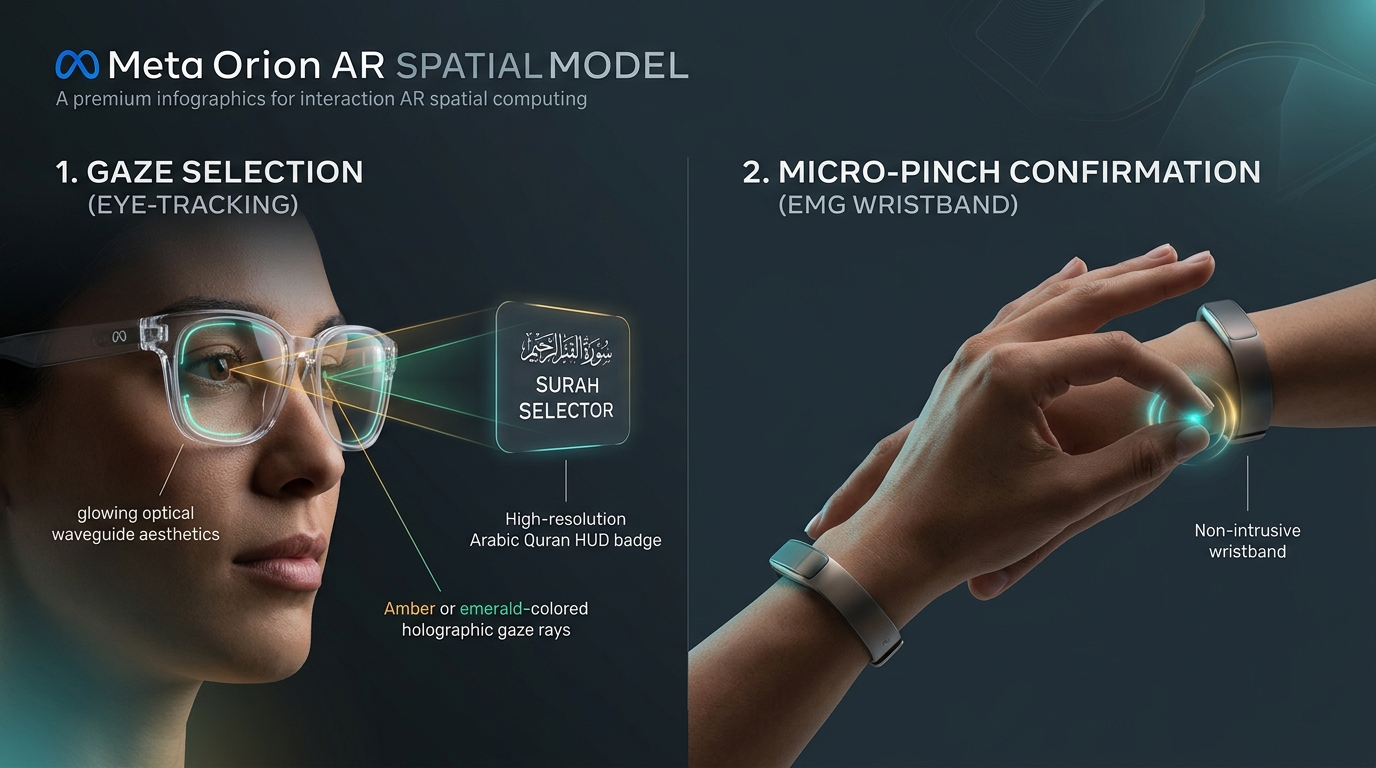
1. Eye-Gaze Selection (Look to Focus):
The user simply looks at any button or badge with their eyes (e.g., looking directly at the floating Surah Selector badge or Prompter Mode pill). Orion’s inward-facing eye-tracking cameras detect the exact focal gaze vector on the optical waveguide and highlight the targeted element with a subtle holographic glow.
2. Micro-Pinch Confirmation (Tap Index + Thumb to Click):
Once targeted by your eyes, gently tap your index finger and thumb together (👌 / 🤏). Orion’s neural EMG wristband registers the micro-motor nerve signals at your wrist. This triggers an instant click with your hand resting naturally in your lap or at your side in prayer posture (Qiyam), without raising your arms or moving your elbows.
📖 How to Select Surah, Ayah & Speech Pacing in Orion
1. Selecting Surah & Ayah with Multi-Surah Fuzzy Search
- Gaze + Micro-Pinch on Surah Badge: Look directly at
سورة الفاتحة(or press S) and pinch to open the Spatial Surah & Ayah Selector Modal. Looking atآية 1opens the modal focused on the Ayah stepper. - Tokenized Fuzzy Sliding-Window Search (Hands-Free or Typed):
Inside the selector, tap the microphone button or type any phrase (e.g. "فبأي آلاء ربكما", "الحمد لله", "سورة الكهف", or "18").
- Acoustic & Orthographic Resilience: Built-in 45ms in-memory sliding-window matcher tolerates spoken variations, dropped/added Hamzas (
أ/إ/آ ↔ ا), open-Taa (رحمت ↔ رحمة), dagger Alifs (رحمن ↔ رحمان), and attached particles (و/ف/ل/ب/ال). - Dynamic Cyan Phrase Highlighting: Matched search phrase tokens are illuminated in radiant Electric Cyan (
#38BDF8) directly inside the Arabic text while preserving 100% of authentic Quranic Tashkeel and pause symbols. - Multi-Surah Result Cards: If a verse appears across multiple Surahs, each Surah is displayed as an individual interactive card.
- Intra-Surah Deduplication ("The Ar-Rahman Rule"): If a verse repeats multiple times within the same Surah (e.g., «فَبِأَيِّ آلَاءِ رَبِّكُمَا تُكَذِّبَانِ» repeating 31 times in Surah Ar-Rahman 55), the engine consolidates them into a single card with an amber badge:
🔄 يتكرر (31) مرات. - Dual Action Buttons: Choose
🎯 انتقال مباشر (Jump)for an immediate jump or🕌 نمط الصلاة (Salah Mode)to start with Surah Al-Fatiha and queue the target verse for prayer.
- Acoustic & Orthographic Resilience: Built-in 45ms in-memory sliding-window matcher tolerates spoken variations, dropped/added Hamzas (
2. Selecting Speech Pacing
- Click or micro-pinch the "Scene" button in the top bar to open the Settings Drawer.
- Under Speech Pacing, select your preferred engine behavior:
🎯 Strict Pacing: Enforces strict word-by-word recognition. The prompter will not advance until the exact next word is pronounced (ideal for students and rigorous memorization tests).⚡ Smart Assist: Utilizes fuzzy phonetic tolerance to gracefully accept minor dialect variations, slurred endings, or background acoustic noise without stalling the reciter.
3. Selecting Prompter Modes
- Quick Cycle: Micro-pinch the mode badge in the HUD header or press M to cycle modes.
- Via Settings Drawer: Open the "Scene" drawer and select directly from the 3 prompter pills:
🛡️ Safety-Net: Words stay softly dimmed/invisible, appearing gently only if hesitation is detected (>1.5s in demo, >2.2s in prayer).📖 Continuous Flow: Smooth 2-line optical rolling teleprompter.🧠 Hafiz Blind: Words remain blank until correctly articulated.
4. Imam Salah: Takbeerat Al-Intiqāl & Optical Khushū' Dimming (Prayer Standby)
In 🕌 Imam Salah Mode, the system delivers unprecedented optical reverence and Fiqh compliance:
- Acoustic Transition Detection: Real-time recognition of prayer transition phrases: «اللَّهُ أَكْبَرُ» (Takbeer), «سَمِعَ اللَّهُ لِمَنْ حَمِدَهُ» (Tasmee'), and «رَبَّنَا وَلَكَ الْحَمْدُ» (Tahmeed).
- Optical Khushū' Dimming: Moving into bowing (Rukū') and prostration (Sujūd) auto-dims the optical display (
opacity: 0.35, blur0.6px) to eliminate distracting light glare on the prayer mat, displaying[🕋 ركوع / سجود — خفوت الخشوع (Khushū' Dim)]. - Seamless Rak'ah 2 Fatihah Recovery: When the Imam rises to the second Rak'ah and recites «الْحَمْدُ لِلَّهِ رَبِّ الْعَالَمِينَ», the HUD automatically restores 100% brightness and resumes tracking effortlessly.
- Sirr (Silent) Basmalah Compliance: Surah Al-Fatihah begins directly from «الْحَمْدُ لِلَّهِ» without displaying un-recited Bismillah, matching authentic congregational practice.
⌨️ Meta Orion Glasses Hardware Controls & Hotkeys Table
| Action | Meta Orion Hardware / Gesture | Simulator / Keyboard Shortcut | HUD Function / Behavior |
|---|---|---|---|
| Select Surah & Ayah | Gaze at Surah Badge + Micro-Pinch | S or click Surah badge | Opens spatial modal with tokenized fuzzy search, multi-surah cards & cyan highlights |
| Context Mode Dropdown | Gaze at Context Dropdown + Micro-Pinch | Click Context dropdown | Switch context: Hifz Study, Imam Salah, Imam Follower (with auto-locked pacing), or Judge |
| Cycle Prompter Mode | Gaze at Mode Badge + Micro-Pinch | M or click Mode badge | Cycles between visual prompter modes: Safety-Net, Continuous Flow, and Hafiz Blind |
| Takbeer / Rukū' Dimming | Speak "الله أكبر" in Imam Salah | Voice / Automatic in Prayer | Dims HUD to 35% opacity & blur for prostration reverence; auto-brightens on Rak'ah 2 Fatihah |
| Open Settings Drawer | Gaze at "Scene" + Micro-Pinch | Click "Scene" button | Opens drawer to adjust Speech Pacing (Strict vs Smart Assist) & Background |
| Reveal Next Hint | Single-Tap on right frame temple arm | H or P | Unmasks next word hint discretely |
| Next Ayah | Double-Tap on right temple arm or double-pinch | → or double P | Advances forward to next verse |
| Previous Ayah | Swipe Backward on right temple arm | ← or long-pinch | Returns to previous verse |
| Back 1 Word | Left-hand single micro-pinch | O | Re-masks current word and steps back one word |
| Rewind Current Ayah | Left-hand double micro-pinch | Double O | Rewinds prompter to start of current verse |
| Gaze-Dwell Hint | Look down at floor prostration line (1.2s) | Hover over bottom border line | Triggers hands-free hint (Mawdi' al-Sujud) without touch |
| Toggle Microphone | Voice command / automatic in prayer | Spacebar | Toggles live audio speech recognition with real-time VU meter & blue/red live transcript |
| Sample Reciter | — | D or click "Play Sample Reciter" | Automated demo of Sheikh Al-Husary recitation with auto-sync |
| Webcam Passthrough | — | C | Toggles live webcam passthrough background (simulates see-through lenses) |
| WebXR AR Mode | Gaze at XR Badge + Micro-Pinch | W | Launches/exits WebXR immersive 6DoF session |
| Close Modal / Exit HUD | — | ESC | Closes active modal, settings drawer, or exits AR HUD |